Style preset is the single most consequential decision in AI fan art. We map all 24 elserip presets to the IP families and creative goals that actually fit them, with the rules we use in-house.
Picking the wrong style preset is the single biggest reason your fan art doesn't look like the IP. It's not your prompt, your reference, or your model choice — it's that you used Cel Render for a Studio Ghibli landscape that needed Animation Film. The 24 presets in elserip aren't 24 flavours of the same thing; they're 24 distinct rendering pipelines, and most fan-art mistakes come from picking from the wrong family before you even start typing.
This guide groups all 24 into three families based on how the model actually treats your input, then maps each family to the IPs and creative goals it serves best. Read the table once, bookmark it, and your hit rate will roughly double.
01 · The Three Style Families
Every preset falls into one of three families — and the family decides everything else. Pick the family first, narrow within it second. Trying to pick a single preset out of 24 cold will burn ten renders before you find the right one.
| Family | Presets | Use For | Avoid For |
|---|---|---|---|
| Hand-Drawn | Cel Render, Hand-Draw 2D, Clean Toon, Action Comic, Japanese Classic Anime, Animation Film | Anime IPs (JJK, Demon Slayer, Naruto), manga-derived characters, idol art, classic shōnen | Realistic photo refs, 3D-source IPs, modern game characters |
| 3D / CG | 3D Cute Toon, Ultra Fantasy CG, Clay Toon, Oriental 3D, Puppet, Realistic | Game IPs (Genshin Impact, Honkai Star Rail, Zenless Zone Zero), VTuber designs, modern character models | Classic 90s anime, hand-drawn manga panels, sketch-style work |
| Stylized / Niche | Pixel, Warm Pixel, Cyberpunk, Neon Noir, Retro Tale, Wander Tale, Yellow Toon, Furry Toon, Flat Cartoon, Cinema Toon, Line Art, Epic Fantasy | Mood pieces, AU (alternate universe) art, retro reinterpretations, indie OCs, vibe boards | Faithful IP recreations, character-sheet work |
02 · Hand-Drawn Family — When Anime Has to Look Like Anime
Hand-drawn presets reproduce the look of cel animation: line-weight variation, flat colour fills with hard light/shadow boundaries, no continuous gradients. This is what 95% of fan art for anime IPs like Jujutsu Kaisen, Demon Slayer, and Naruto is reaching for, even when the artist can't articulate it.
Within the family the choice is mostly about era and intensity:
- Cel Render — the safe default. Modern post-2015 TV anime look. Use this when you don't know what else to use.
- Japanese Classic Anime — pre-2000s grain, slightly washed palette. Pick this for retro AUs or 80s/90s IPs (Akira, Evangelion, classic Slam Dunk).
- Animation Film — softer linework, painted backgrounds, Ghibli-adjacent. Pick this for landscapes, slice-of-life, anything where the background is a co-star.
- Hand-Draw 2D — visible pencil strokes, slightly looser lines. Best for sketch-feel pieces and rough work.
- Clean Toon — flatter, brighter, very clean lines. Picture-book / merchandise vibe. Strong for chibi and Q-versions.
- Action Comic — heavy shadows, dramatic angles, manga-panel feel. Pick this for fight scenes and shōnen energy.
03 · 3D / CG Family — When the Source Was Already a Model
If the IP started as a 3D model — anything from Genshin Impact and Honkai Star Rail to Zenless Zone Zero, Wuthering Waves, or any modern Hoyoverse-adjacent game — the fan-art audience expects volumetric rendering. Hair has actual mass. Capes catch light. Skin has subsurface scatter. Hand-drawn presets fight all of that. We dig into why this aesthetic dominated 2025 elsewhere on the journal.
Three picks cover 90% of cases:
- 3D Cute Toon — your default for any Hoyoverse-style IP. The toon-shaded 3D look the games already have.
- Ultra Fantasy CG — bumps the rendering quality up: more detail in cloth, jewellery, weapon textures. Use for hero-shot pieces.
- Realistic — only when the IP actually wants photoreal (some VTuber portraits, modern fighter designs). Don't use this on cute character designs — it makes them look uncanny.
Specialty 3D picks
- Clay Toon — soft stop-motion feel. Great for IPs with a craft / handmade aesthetic.
- Oriental 3D — eastern fantasy aesthetic, Chinese xianxia and wuxia palette. Use for Honor of Kings, Naraka Bladepoint, xianxia OCs.
- Puppet — articulated-figure look. Niche, but unmistakable when you need it (anything Mappa-style mecha can read well here).
04 · Stylized / Niche — Mood Over Likeness
The third family is where you go when likeness is not the priority — when you want a vibe, an alternate universe, a retro reinterpretation, a poster. These presets push the input through a strong stylistic filter, which means lower fidelity to the source and higher artistic identity.
Don't use these for fan art aimed at "this is exactly the character." Use them when the goal is "this is the character if she lived in 1985 / in cyberspace / as a sticker."
- Pixel / Warm Pixel — 16-bit and 32-bit RPG aesthetics. Perfect for retro-RPG AUs, sprite-sheet exercises, and Stardew-Valley-fies.
- Cyberpunk / Neon Noir — neon palette, hard shadows, rain. Use for any "X but cyberpunk" prompt or original OCs in the genre. Our 12 cyberpunk prompt patterns cover most use cases.
- Retro Tale / Wander Tale — storybook illustration. Perfect for AU pieces that want a children's-book frame.
- Yellow Toon / Flat Cartoon — Western flat-style cartoon. Lower lift on character details, higher graphic identity. Good for Spotify-cover-style work.
- Cinema Toon — cinematic colour grading layered over a 2D look. Picks up the heavy shadows of film noir.
- Furry Toon — purpose-built for kemono / furry fan art communities.
- Line Art — pure line-work output. Use as a base layer for further passes, or as a deliverable for sticker / print work.
- Epic Fantasy — the heavy painterly preset. Best for D&D-style portraits, hero shots, anything that wants the Lord-of-the-Rings cover-art treatment.
05 · The Three Most-Used Combos In Our Studio
If you only ever learn three preset-and-prompt combinations, the three below cover most of what gets shipped from the elserip studio in a given week. Each is a copy-paste starting point — drop in your subject and scene, keep the style line as-is.
prompt01// COMBO 1 — Modern anime IP, character-focus02[SUBJECT] <character name>, signature outfit, characteristic accessory03[SCENE] <pose / action>, <lighting>, three-quarter angle04[STYLE] Cel Render preset · soft rim light · 9:160506// COMBO 2 — Hoyoverse-style game IP07[SUBJECT] <character name>, full costume, character-canon weapon08[SCENE] <scene>, dramatic backlight, hero pose09[STYLE] 3D Cute Toon preset · rim light + ambient occlusion · 2:31011// COMBO 3 — Original OC, retro AU12[SUBJECT] <oc description>, era-appropriate styling13[SCENE] <setting>, <time of day>, soft focus14[STYLE] Retro Tale preset · grain on · 4:506 · How to Decide When You're Stuck
When two presets in the same family seem equally plausible, the deciding question is almost always about the era of the source material, not your taste. Render the same prompt under both — same seed range, same scene — and put them next to each other. Drift between two same-family presets is small; drift across families is enormous.
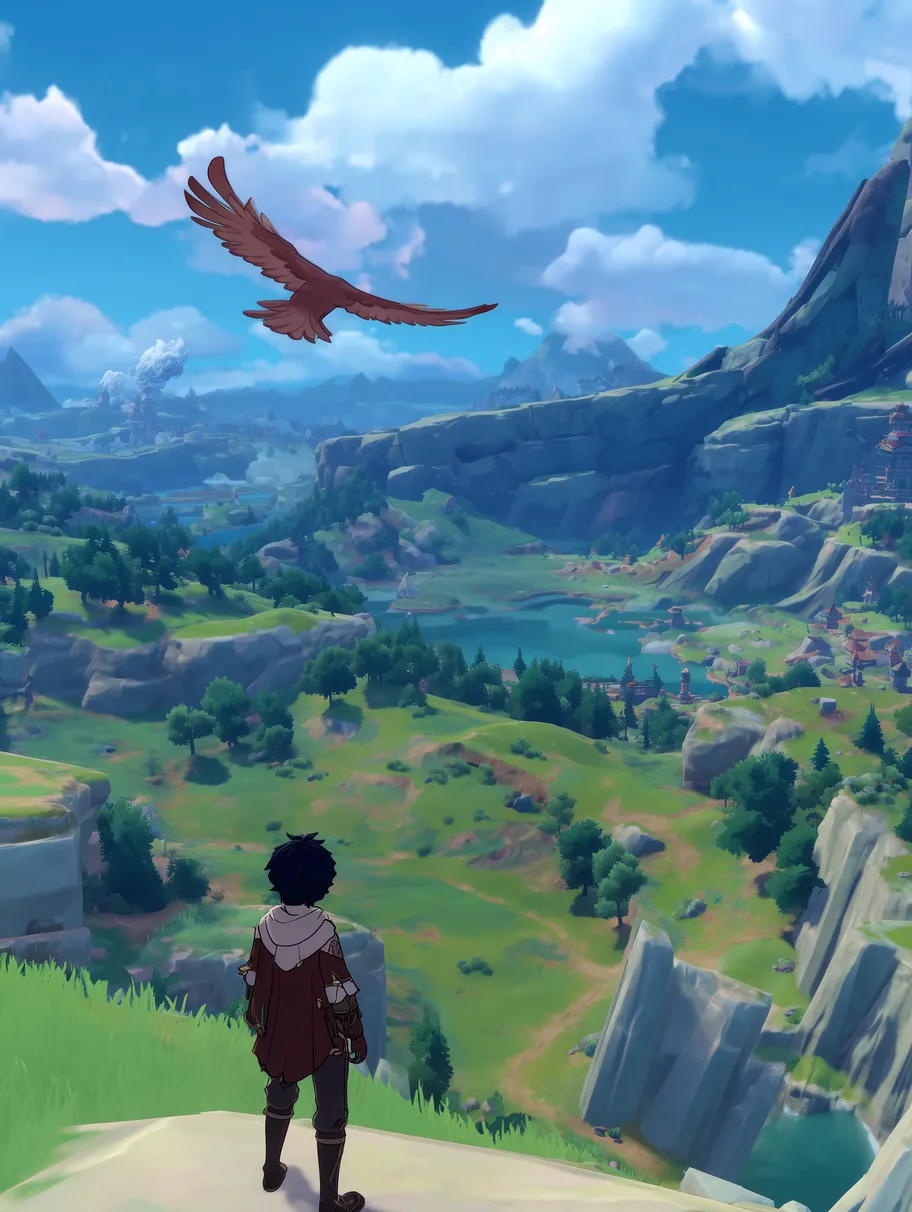
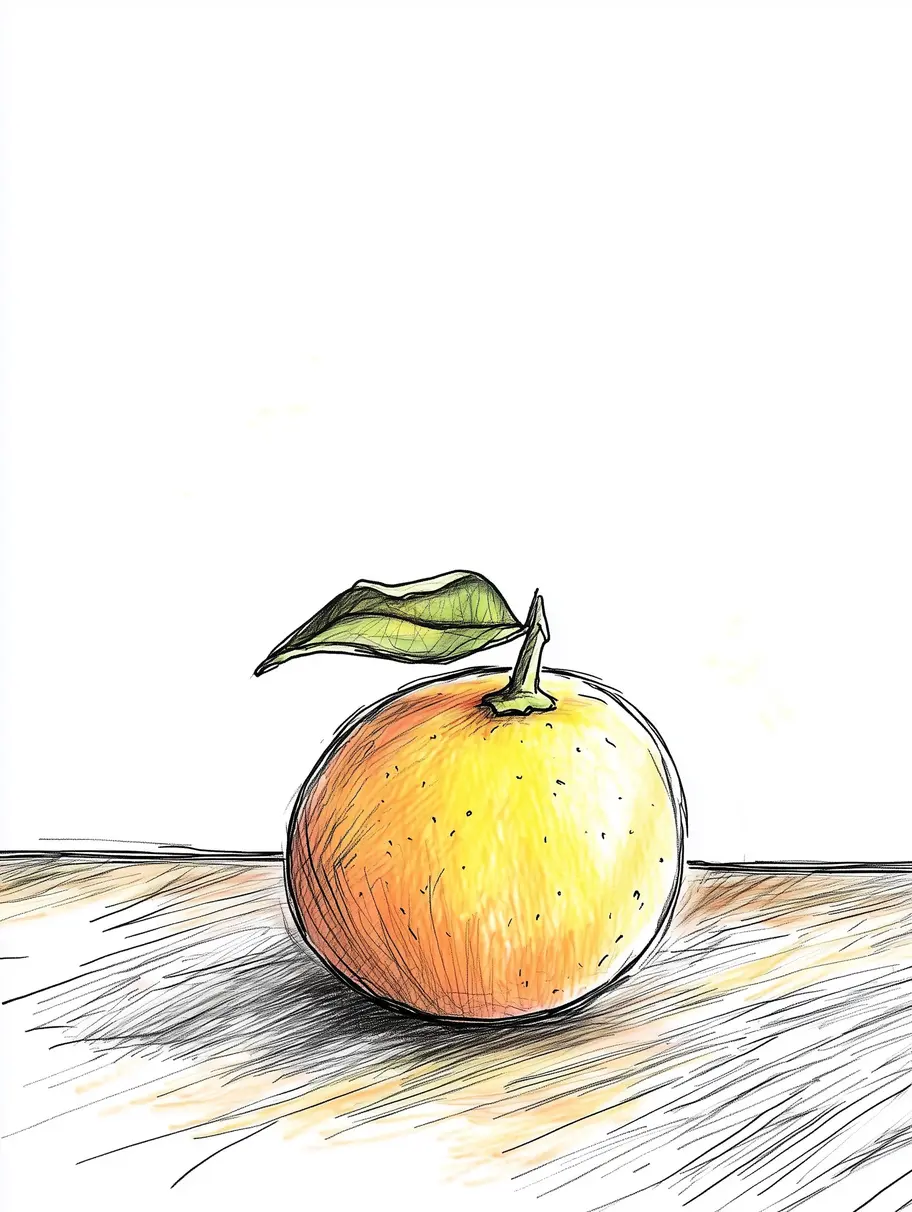
The two preset previews above are typical outputs from each preset, not the same scene rendered twice. The differences are obvious even on different subjects: Cel Render produces cleaner edges and saturated fills against a glossy game-engine palette; Hand-Draw 2D leaves visible stroke texture and lower contrast. Both are technically "anime," but one reads as TV-anime and the other as a concept-art page. The IP and the audience decide which is right.
FAQ
What's the best anime style preset for Genshin Impact fan art?
Should I use Cel Render or Hand-Draw 2D for Jujutsu Kaisen art?
Can I mix style presets within the same series of renders?
Which preset should I use for original characters (OCs)?
How many renders does it usually take to lock a style?
TL;DR
Pick the style family first, then the preset. Hand-drawn family for anime IPs (default to Cel Render). 3D / CG family for Hoyoverse-style game IPs (default to 3D Cute Toon). Stylized family only when likeness is not the goal. Most fan-art mistakes come from forcing a 3D-source IP through a hand-drawn preset (or vice versa) — the prompt isn't the problem, the family is. When stuck between two in the same family, render both and compare; the answer is always obvious side-by-side.
The right preset is the one that disappears. Pick the wrong family and you'll spend twenty renders fighting the model.— elserip editorial